
Scrolling text vertically by jQuery
The vertical scrolling of text can be used for purposes like news or press release scrolling. You may use it for scrolling the updates about the website or newly added features etc.
By using jQuery.scrollText plug-in, you may create a customized section with vertical text scrolling in your web pages. You may set the duration of the scroll to next item along with other options.
See the section below for live demos and how to download and set up this simple plugin on your website.
A demo of scrolling text vertically
The headlines or updates are placed by using the <ul> and <li> tags. Obviously, it can be database driven and as many as you want. You may style the text, use links etc inside the vertical scrolling section. Have a look with the simple default layout:

See online demo and code
The duration is set as 2000 milliseconds or two seconds.
The script:
 <script type="text/javascript">

      $(function(){

        $(".container").scrollText({

        'duration': 2000

  });

 });

 </script>
The markup used for the demo:
 <div class="container">

                                <ul>

                                                <li>News Headline 1</li>

                                                <li><a href="#">jQuery new version released!</a></li>

                                                <li>Bootstrap is a popular web framework</li>

                                                <li><a href="#">An update about Java</a></li>

                                                <li>AMP is implemted by Google for fast internet</li>

                                                <li>PHP udpate</li>

                                                <li>HTML 5 update</li>

                                                <li>Python - A high level language</li>

                                                <li>Bootstrap will release an update soon!</li>

                                </ul>

 </div>
A little CSS is used for styling as you can see in the style section.
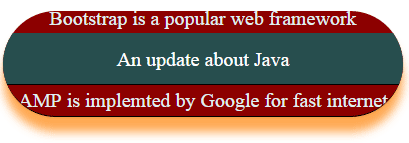
A demo of customizing the jQuery scrolling of text
In this demo, I have used a different style for scrolling the text vertically. Not much is changed than the above example, except different CSS is applied to the scrolling text section. Apart from that, the scrolling speed is changed to 1500 milliseconds:
Complete code:
<!DOCTYPE html>
<html>
    <head>

	<style>
		ul, li {
			padding: 0;
			margin: 0;
			list-style: none;
			text-align: center;
            color: #e0eff2;
            font-size: 20px;
		}
        ul  li a {
            text-decoration: none;
            color: #fff;
            background-color: #274E4E;
            padding: 10.5px 11px;
            display:block;
            border-bottom:solid 1px #000;
        }
        ul li a:hover {
            color: #000;
            background-color: #FBE9AC;
        }
		.container {
              width: 400px;
              height: 105px;
              text-align:left;
              overflow: Hidden;
              line-height: 30px;
              margin: 15px;
              background: #8C0000;
              color:#fff;
              border-radius:55px;
              border-bottom:solid 1px #000;
              box-shadow: 0 15px 13px rgba(255, 148, 40, 0.8), 0 1px 2px rgba(0, 0, 0, 0.24);
		}
	</style>
    </head>

    <body>
	<div class="container">
		<ul>
			<li>News Headline 1</li>
			<li><a href="#">jQuery new version released!</a></li>
			<li>Bootstrap is a popular web framework</li>
			<li><a href="#">An update about Java</a></li>
			<li>AMP is implemted by Google for fast internet</li>
			<li>PHP udpate</li>
			<li>HTML 5 update</li>
			<li>Python - A high level language</li>
			<li>Bootstrap will release an update soon!</li>
		</ul>
	</div>
    <script src="https://ajax.googleapis.com/ajax/libs/jquery/3.1.1/jquery.min.js"></script>
	<script type="text/javascript" src="js/scrollText/jQuery.scrollText.js"></script>
	<script type="text/javascript">
		$(function(){
			$(".container").scrollText({
				'duration': 1500
			});
		});
	</script>
    </body>
</html>
How to set up this plug-in?
Step 1:
First of all, download the plug-in from Github website.
Step 2:
Include the reference of plug-in and jQuery JS file above the </body> closing tag:
<script src=”https://ajax.googleapis.com/ajax/libs/jquery/3.1.1/jquery.min.js”></script>
<script type=”text/javascript” src=”js/scrollText/jQuery.scrollText.js”></script>
You may also get the JS file by view source the above demos and right clicking the jQuery.scrollText.js file and saving it in your system.
Step 3:
After writing the markup and style, call the scrollText function as shown in above demos.