How to swap numbers in C++ program?
In this tutorial, we will show you how to swap numbers in C++ in the following ways:
- By using the swap() bulit-in function
- By using the temporary variable
- Using + and –
- Using * and /
First Way – Using a built-in swap function
C++ Standard Template Library has a built-in function (std::swap) that you may use to swap two numbers.
You simply provide two numbers to swap() function i.e.
In this way, you do not need a third variable.
An example of using the C++ swap function
The example below shows using the swap() function to interchange two variable values by using swap() function:
#include <bits/stdc++.h>

using namespace std;

int main() {

   int x = 35, y = 75;

   cout << "Value of x before swap: " <<x << "\n";

   cout << "Value of y before swap: " <<y << "\n";

   //Using swap() function swap two values

   swap(x, y);

   cout << "####################################\n";

   cout << "Value of x after swap: " <<x << "\n";

   cout << "Value of y after swap: " <<y << "\n";

   return 0;

}
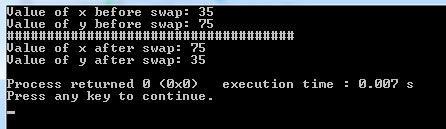
Output:
Taking user input for swapping two numbers program
In this program, the user is asked to enter two numbers to be swapped.
- The first entered number is assigned to variable x.
- The second number is assigned to the variable y.
- The swap() function is used
- The swapped numbers are displayed as follows:
#include <bits/stdc++.h>
using namespace std;
int main() {
int x,y;
cout << "Enter first number: ";
cin >> x;
cout << "Enter second number: ";
cin >> y;
cout << "####################################\n";

cout << "Value of x before swap: " <<x << "\n";
cout << "Value of y before swap: " <<y << "\n";
//Using swap() function swap two values
swap(x, y);
cout << "####################################\n";
cout << "Value of x after swap: " <<x << "\n";
cout << "Value of y after swap: " <<y << "\n";
return 0;
}
A sample output:
Value of y before swap: 75
####################################
Value of x after swap: 75
Value of y after swap: 35
Second way: Using a temporary third variable technique to swap numbers
As the target is to swap two variable values.
- We can use the third variable to temporarily hold the first variable value.
- Then copy the contents of the second variable to the first.
- Finally, copy the contents of the third variable (temporary) to the second variable.
See this in action below:
#include <iostream>

using namespace std;

int main()

{

   int x,y,z;

    cout << "Enter first number: ";

    cin >> x;

    cout << "Enter second number: ";

    cin >> y;

   cout << "####################################\n";

    cout << "Numbers Before swapping" << endl;
    cout << "x = " << x << "\n y = " << y << endl;

    z = x;
    x = y;
    y = z;

    cout << "\nNumbers After swapping" << endl;
    cout << "x = " << x << "\n y = " << y << endl;

    return 0;

}
Sample Output:
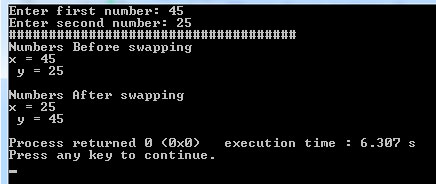
In the program,
- The user is asked to two numbers to swap
- Numbers are assigned to variables x and y
- A temporary variable z is used to hold the value of x
Swap numbers without a third variable by + and –
In this technique, we will perform addition and subtraction to swap the numbers of two variables.
Suppose:
x= 10;
y= 20
x = x + y = 30
y = x – y i.e. (30-20) = 10
x = x – y i.e. (30 – 10) = 20
Done?
Let us see this in C++ program:
#include <iostream>

using namespace std;
int main()

{

   int x,y;

    cout << "Enter first number: ";
    cin >> x;
    cout << "Enter second number: ";
    cin >> y;
    cout << "####################################\n";

        cout<<"Numbers Before swap\n x= "<<x<<"\n y= "<<y<<endl;

        x=x+y;
        y=x-y;
        x=x-y;

        cout << "####################################\n";

        cout<<"Numbers After swap\n x= "<<x<<"\n y= "<<y<<endl;

    return 0;
}
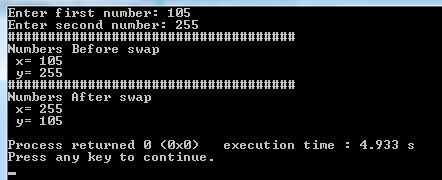
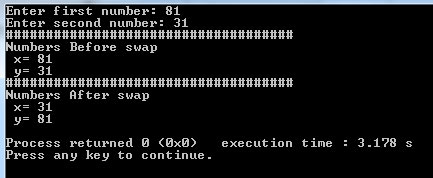
A sample output:
Using * and / for number swapping example
You may also use division and multiplication to swap numbers without using the built-in swap function or a third temporary variable.
Again, let us suppose:
x = 10
y = 20
The logic to achieve the result is:
x = x * y: (10*20)= 200
y = x/y: (200/20) = 10
x = x/b : (200/10) = 10
Swapped?
C++ program to swap by /* technique
#include <iostream>

using namespace std;

int main()

{

   int x,y;

    cout << "Enter first number: ";

    cin >> x;

    cout << "Enter second number: ";

    cin >> y;

    cout << "####################################\n";

        cout<<"Numbers Before swap\n x= "<<x<<"\n y= "<<y<<endl;

            x=x*y;
            y=x/y;
            x=x/y;

        cout << "####################################\n";
        cout<<"Numbers After swap\n x= "<<x<<"\n y= "<<y<<endl;

    return 0;

}
Sample output as we entered two numbers: